
Locking down Gemini in Google Workspace isn’t one setting. It’s six separate controls that each govern a different surface, layered in a specific order where some override others entirely. Configuring one and assuming it covers the rest is the most common way an admin ends up with a governance picture that looks complete and isn’t.
This puts every control in one place, in the order that actually matters, and names the two gaps documented elsewhere in this series that no combination of these settings closes on their own.
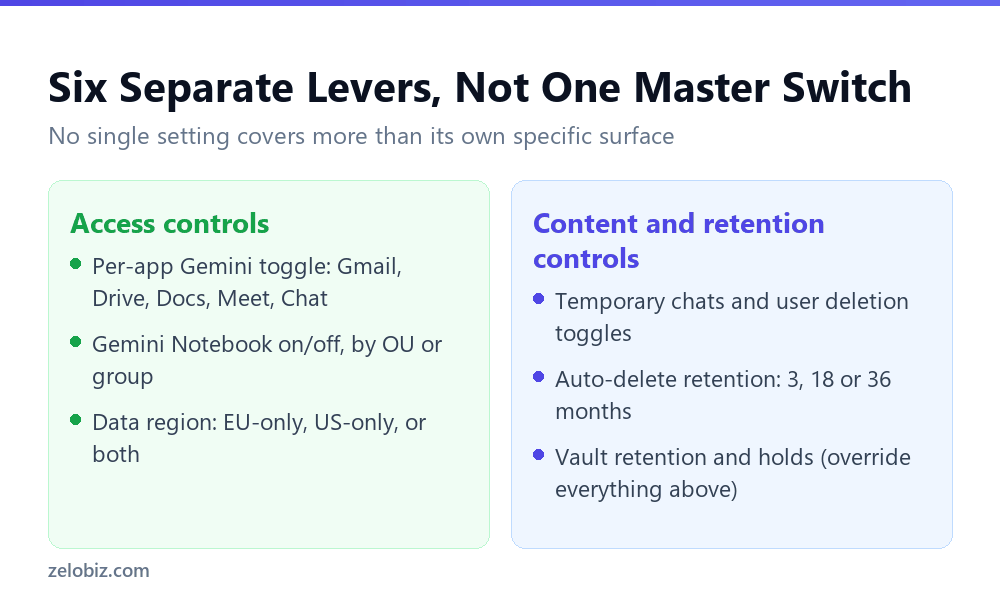
Short answer: Six controls actually govern Gemini in Google Workspace: per-app access toggles for Gmail, Drive, Docs, Meet and Chat; a separate Gemini Notebook on/off toggle; data region settings for EU-only, US-only or both processing; temporary chat and user deletion toggles; automatic retention periods of 3, 18 or 36 months, or indefinite; and Vault retention rules and holds, which override every other setting on this list when active. None of these substitute for each other, and two documented gaps, Vault’s narrow standalone-app scope and Gemini Notebook’s exemption from data region rules, aren’t closed by any combination of the rest. Verified against Google’s own admin documentation on 5 September 2026.
The Six Controls
1. Per-app access
Administrators can enable or disable Gemini features and the side panel independently in Gmail, Drive, Docs, Meet and Chat. This is the coarsest control, an on/off switch per product, and the first place to look if the goal is simply preventing Gemini use in a specific tool entirely.
2. Gemini Notebook access
Separate from the five products above, Gemini Notebook has its own on/off toggle, scopable to a specific organisational unit or group. This is worth treating as genuinely separate rather than assuming it’s bundled with the general Gemini toggles, particularly given the data residency gap documented elsewhere in this series.
3. Data regions
For the Gemini app, admins can configure EU-only storage and processing, US-only, or both, down to the organisational unit level. This control explicitly does not extend to Gemini Notebook, which operates outside data region rules entirely regardless of how this setting is configured.
4. Temporary chats and user deletion
Two toggles, scoped domain-wide, by organisational unit, or by configuration group (with groups overriding organisational units): whether users can start chats that don’t save to their activity, and whether they can delete their own conversation history.
5. Automatic retention periods
Absent Vault governing retention, admins can set conversations to auto-delete based on inactivity, at 3 months, 18 months, or 36 months, or choose to retain them indefinitely. This is the default retention behaviour that applies when nothing stronger is configured.
6. Vault retention and holds
The strongest control on this list, and the one that overrides every setting above it when active. Vault rules take precedence over admin console settings and user settings entirely. Its documented scope, however, is the standalone Gemini app specifically, not every surface Gemini touches.
What Actually Overrides What
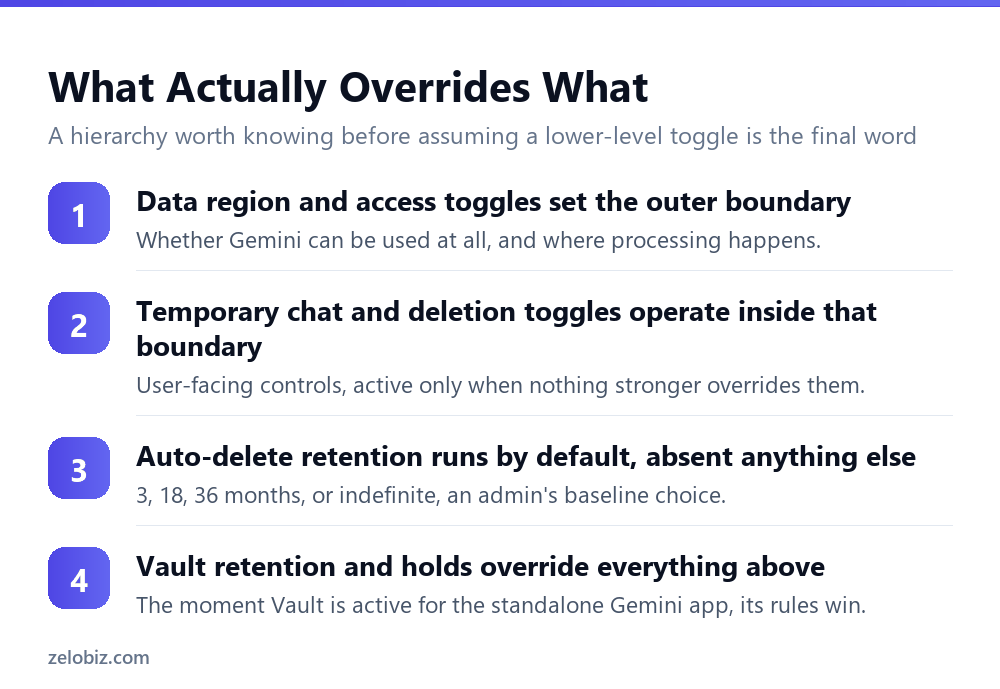
These six controls aren’t six independent dials. They form a hierarchy, and knowing which sits above which prevents the common mistake of configuring a lower-level setting and assuming it’s the final word.
⚠️ Watch out: The two gaps already documented in this series sit outside this entire hierarchy. Vault retention and holds only cover the standalone Gemini app, not embedded features in Gmail, Docs, Sheets, Meet or Chat. Data region settings don’t extend to Gemini Notebook at all. No combination of the six controls above closes either gap; they require separate handling specifically.
Who Should Actually Own Each Piece
These six controls rarely sit with one person in a real organisation, which is part of why gaps open up between them. Recognising who typically owns each decision helps explain why coordination, not just configuration, is the actual work involved.
The pattern worth noticing: the further down this list, the more the actual decision belongs to legal or compliance rather than IT alone, even though IT is who executes the configuration in every case. An organisation where IT configures Vault retention without legal’s specific input on scope and duration is optimising for technical correctness while potentially missing the actual compliance requirement driving the need for it in the first place.
The Checklist, in Practice
Working through this in a specific order avoids the two most common configuration mistakes: assuming coverage that isn’t there, and setting controls that get silently overridden by something configured elsewhere.
- Start with per-app access. Decide which of Gmail, Drive, Docs, Meet and Chat should have Gemini available at all, before configuring anything downstream.
- Decide on Gemini Notebook separately. Given its documented exemption from data region and sharing rules, this deserves its own explicit decision rather than inheriting whatever the general Gemini toggles are set to.
- Set data regions if regional compliance matters. Remembering this doesn’t reach Notebook, which needs its own separate handling.
- Configure temporary chats and deletion for genuine user privacy needs, understanding these get overridden the moment Vault retention or a hold applies.
- Set a default retention period for the baseline case where nothing stronger governs a conversation.
- Layer Vault retention or holds on top for anything requiring actual legal preservation, knowing this covers the standalone app and not embedded features elsewhere.
💡 Pro tip: Revisit this checklist whenever your organisation’s compliance obligations change, rather than treating it as a one-time setup. A new regulatory requirement or a new legal hold obligation may need reconfiguration at several of these six levels at once, not just the one that seems most directly relevant.
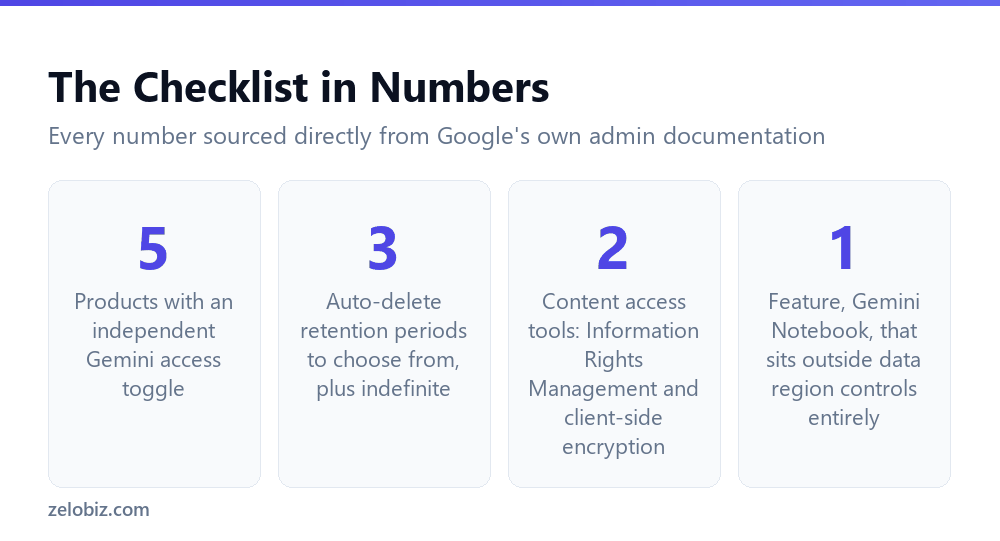
📊 Note: Two content-access tools sit alongside this list rather than inside the hierarchy: Information Rights Management, which can disable download, copy or print on specific content, and client-side encryption. Both can be used to restrict what Gemini is able to access in the first place, functioning as a different kind of control from the six above, closer to restricting the input than governing the output.
Why This Needs a Checklist Rather Than a Single Toggle
It’s worth pausing on why Google spread this across six separate controls instead of offering one master switch for Gemini governance, since understanding the reasoning makes the checklist easier to apply correctly rather than by rote.
Each of the six controls addresses a genuinely different kind of decision. Per-app access is a product decision, whether Gemini belongs in a specific tool at all. Data region is an infrastructure decision, where processing physically happens. Retention and Vault are legal and compliance decisions, how long content exists and who can reach it later. Temporary chats and deletion are user experience decisions, how much control an individual has over their own activity.
Collapsing these into one setting would force every organisation into the same answer across four or five genuinely separate questions, when in practice an organisation might reasonably want Gemini fully available in Docs but restricted in Chat, EU-only processing but a generous retention window, or user-controlled deletion for routine work paired with mandatory holds for a specific legal matter. The six-control structure exists because these are six different questions with six different right answers depending on context, not because Google made governance unnecessarily complicated.
Revisiting the Checklist Over Time
None of these six controls, or the two gaps sitting outside them, are fixed permanently in their current form. Google continues actively developing Gemini’s governance surface, and both gaps documented in this series, Vault’s app-only scope and Notebook’s residency exemption, are the kind of thing Google has a track record of eventually extending or closing as the product matures.
A checklist configured correctly today against today’s documentation can become incomplete or, less commonly, unnecessarily restrictive as Google’s own controls evolve. Treating this as a living configuration, reviewed on a fixed schedule, whether quarterly or aligned to a broader compliance review cycle, catches drift in either direction before it becomes a problem discovered during an actual incident or audit.
The specific numbers and boundaries documented across this series were all verified directly against Google’s own admin documentation at a specific point in time. Before relying on any of them for an actual compliance decision, confirming against the current state of that documentation is worth the few minutes it takes, particularly given how much this exact area has already changed in the recent past.
Common Questions
How many separate admin controls actually govern Gemini in Google Workspace?
Six distinct ones: per-app access toggles, a separate Gemini Notebook toggle, data region settings, temporary chat and user deletion toggles, automatic retention periods, and Vault retention and holds.
Which control overrides the others?
Vault retention and holds sit at the top of the hierarchy, taking precedence over admin console settings and user settings whenever active, but only for the standalone Gemini app specifically.
Do data region settings apply to Gemini Notebook?
No. Google states data region settings explicitly do not extend to Gemini Notebook, which needs to be controlled through its own separate on/off toggle instead.
What retention periods can an admin choose when Vault isn’t governing a conversation?
3 months, 18 months, or 36 months based on inactivity, or indefinite retention, set through the standard admin console retention controls.
Does setting up temporary chats and user deletion protect users from Vault retention?
No. Those toggles are overridden the moment Vault retention or a hold is active for the Gemini app, regardless of how they’re configured.
What tools exist to restrict what Gemini can access, rather than how long data is kept?
Information Rights Management, which can disable download, copy or print on specific content, and client-side encryption, both usable to limit what Gemini can reach in the first place.
Does configuring all six controls guarantee full governance over Gemini?
No. Two documented gaps sit outside this hierarchy entirely: Vault’s coverage is limited to the standalone Gemini app, not embedded features, and Gemini Notebook operates outside data region rules regardless of how the rest are configured.
The Short Version
- →Six separate controls govern Gemini. None of them substitutes for another.
- →Vault retention and holds override everything else, but only for the standalone app.
- →Data region settings don’t extend to Gemini Notebook at all.
- →Temporary chats and user deletion are overridden the moment Vault governs a conversation.
- →Default retention runs at 3, 18 or 36 months, or indefinitely, absent Vault.
- →Two documented gaps sit outside this whole hierarchy and need separate handling.