
Recall for business gets discussed as a single decision: does IT turn it on or off. Microsoft’s own documentation describes something with an extra step most rollout plans don’t account for, and a reporting mode that stays completely silent to the person it’s protecting.
This covers the two-step opt-in that means enabling Recall organisation-wide doesn’t actually start it for anyone, the real difference between the two DLP enforcement modes, and the specific version and licensing prerequisites a rollout needs before any of it works.
Short answer: An administrator can set a policy giving Copilot+ PC users the option to enable Recall, but Microsoft states this doesn’t automatically start Recall. Each user still has to personally launch Recall and opt in on their own machine before any snapshots are taken. Data loss prevention policies for Recall can either audit sensitive content silently or block it from being captured, and these are meaningfully different controls. Retention runs 30 to 180 days and storage 10 to 150 GB, both admin-configurable. Verified against Microsoft Learn documentation on 4 September 2026.
The Opt-In Has Two Separate Owners
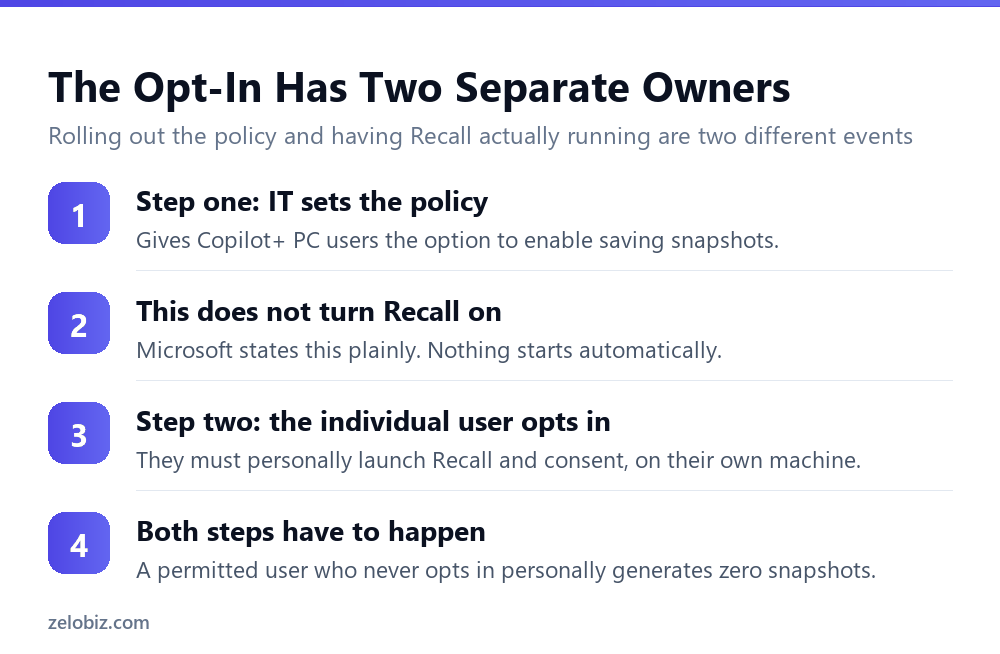
Microsoft’s own wording on this is unambiguous: IT admins can set policies that give Copilot+ PC users the option to enable saving snapshots. This doesn’t automatically start Recall for users. Users must launch recall and opt-in to taking snapshots on their machines.
That is two separate actions by two separate people. An administrator permitting Recall across the organisation, through Intune or Group Policy, changes nothing about whether any individual snapshot ever gets taken. Each user has to independently find Recall and consent to it themselves.
This has a practical consequence for anyone planning a rollout. Assuming a policy change equals adoption will produce a rollout that looks complete on paper and has near-zero actual usage, because the second step depends entirely on individual users choosing to act.
📊 Note: If the goal is broad Recall adoption across an organisation, the policy change is necessary but not sufficient. Communicating to users that the option now exists, and why they might want to opt in, is the step that actually determines whether anyone uses it.
Audit Only and Block Are Not the Same Protection
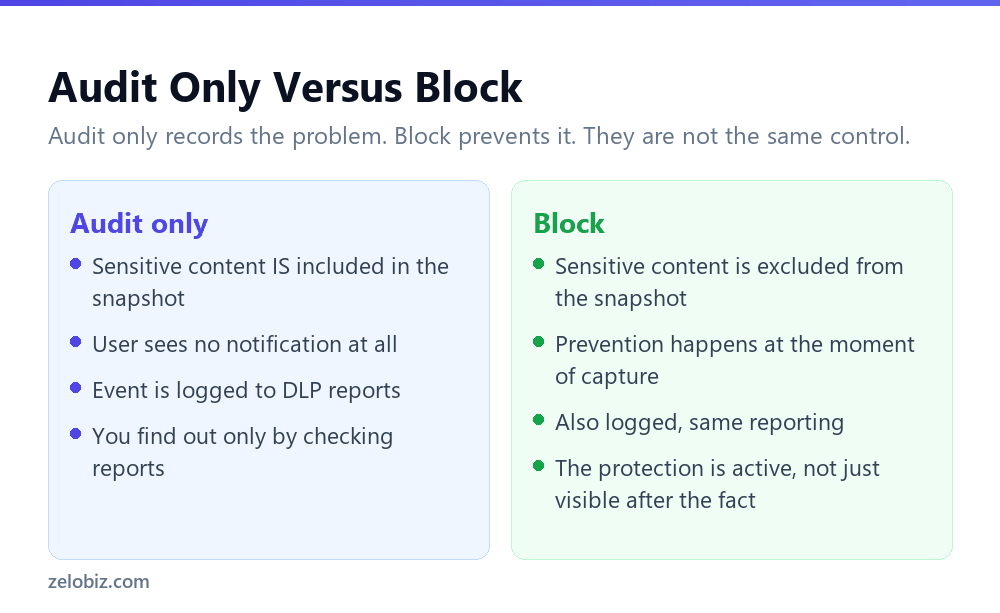
Once Recall is running for a user, a DLP policy can apply one of two actions when sensitive content is detected in what would become a snapshot, and the difference between them is larger than the names suggest.
Audit only: the snapshot still happens
Microsoft states plainly that if you select Audit only, the user doesn’t see any notification when a snapshot is taken that contains sensitive information. The sensitive content is still captured. What changes is that the event is logged in the DLP reports, meaning an administrator can find out after the fact, but the user has no idea it happened at the moment it did.
Block: the sensitive content never gets captured
Under Block, when a snapshot is taken that contains sensitive information, that sensitive content isn’t included in the snapshot. This is genuine prevention at the point of capture, not a record created for later review.
⚠️ Watch out: Audit only is a visibility tool, not a protection. If the goal is actually preventing sensitive content from ending up in a locally stored snapshot, Block is the setting that does that. Audit only tells you it happened after the fact, which is a different and narrower kind of safeguard.
What a Rollout Actually Requires
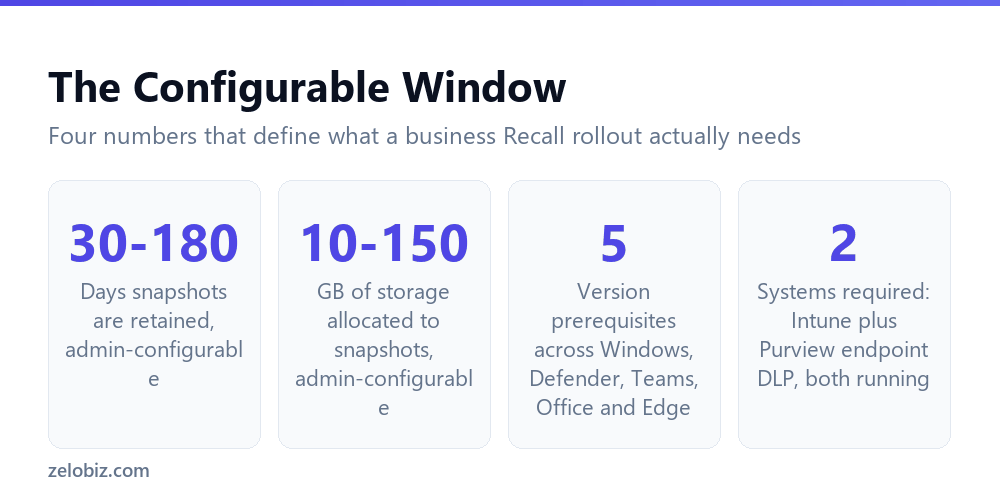
Beyond the opt-in mechanics, DLP protection for Recall depends on a specific technical stack being in place, not just a policy toggle.
Two systems have to be running
Microsoft Purview endpoint DLP has to be enabled for the tenant, with the Copilot+ PC specifically onboarded to it. Microsoft Intune has to be running to create the Windows tenant policies involved. Neither is optional; both are listed as prerequisites before any Recall-specific DLP configuration can begin.
Version requirements across five products
The Copilot+ PC needs minimum versions across several products at once: a specific Windows build, a minimum anti-malware client version, a minimum Teams version, a minimum Office desktop apps version, and Microsoft Edge for Business specifically rather than any Chromium browser. A device behind on any one of these will not have DLP protection for Recall working correctly even if everything else is configured.
The retention and storage window
Two optional Group Policy settings control how much Recall data exists at any given time. Maximum duration for storing snapshots accepts a range of 30 to 180 days. Maximum storage for snapshots accepts a range of 10 to 150, in gigabytes. Neither is required, but both are worth setting deliberately rather than leaving at whatever default applies, particularly for a device handling sensitive material regularly.
💡 Pro tip: Set the retention window to match your organisation’s actual need for looking back through recent activity, not to the maximum available. A shorter window, closer to 30 days than 180, reduces how much locally stored, screen-level history exists on any given device at one time.
Why the Two-Step Design Exists at All
It’s worth asking why Microsoft built the opt-in this way rather than making an admin policy sufficient on its own. Screen-level capture is a categorically different kind of data collection from most enterprise IT controls, since it can include anything visible on screen at any moment, not a defined category of file or message.
Requiring individual, personal consent on top of organisational permission reflects that difference. An organisation can decide the capability should exist. Whether a specific person’s specific screen gets recorded stays, deliberately, a decision that person makes about their own device, even when they work somewhere with otherwise extensive IT control over what’s installed and configured.
This has a practical upside for an organisation weighing whether to enable the option at all: turning on the admin-side policy carries less immediate risk than it might appear, precisely because it doesn’t unilaterally start capturing anything. The actual exposure only begins once, and where, individual users choose to opt in.
What DLP for Recall Actually Covers
Coverage is specific rather than universal. Protection applies to sensitivity labeled Teams channels and meeting chats, files carrying sensitive information types or sensitivity labels opened through the Microsoft 365 Copilot App using Edge for Business, labeled email in Outlook, locally stored files carrying labels or sensitive information types, and cloud files with labels or sensitive information types opened in the Office desktop apps on that device.
This list of covered surfaces is worth checking against how your organisation actually works day to day. A workflow that relies heavily on a browser other than Edge for Business, or a third-party app outside this list, sits outside what this specific DLP protection reaches, regardless of how the policy itself is configured. For how DLP policy changes generally propagate and where similar coverage gaps show up elsewhere in Copilot, see how long a Copilot DLP policy actually takes to work.
A Rollout Checklist That Matches How This Actually Works
Given the two-step opt-in and the specific technical prerequisites, a rollout plan built around a single enable action will underperform. A checklist matched to how the feature actually behaves looks different.
The communication stage is the one most likely to be treated as optional, and it is also the one that determines whether the previous four stages produce any actual adoption. A perfectly configured policy that nobody knows exists results in zero snapshots, technically compliant and practically unused.
Common Questions
If IT enables Recall through policy, does it start working immediately?
No. Microsoft states directly that this doesn’t automatically start Recall for users. Each user still has to personally launch Recall and opt in on their own device before any snapshots are taken.
What is the difference between Audit only and Block for Recall DLP policies?
Audit only still captures the sensitive content in the snapshot and only logs the event, with no notification to the user. Block excludes the sensitive content from the snapshot at the moment of capture, which is genuine prevention rather than a record created afterward.
Does a user get notified when Audit only mode logs their snapshot?
No. Microsoft states the user doesn’t see any notification when a snapshot is taken that contains sensitive information under Audit only. The event only appears in DLP reports for an administrator to review.
How long are Recall snapshots retained in a business environment?
The maximum duration setting accepts a range of 30 to 180 days, configured by an administrator through Group Policy or Intune. It’s optional, but worth setting deliberately rather than leaving at a default.
What systems need to be in place before configuring DLP for Recall?
Microsoft Purview endpoint DLP enabled and the device onboarded to it, plus Microsoft Intune running to create the Windows tenant policies. Both are required prerequisites, not optional extras.
Does DLP protection for Recall cover every app and browser?
No. Coverage is specific to labeled content in Teams, Outlook, locally stored and cloud files opened in Office desktop apps, and content accessed via Microsoft Edge for Business specifically. Other browsers and apps fall outside this particular protection.
Where can an administrator review Recall DLP events?
In Microsoft Purview Activity Explorer, which shows logged events from both Audit only and Block policy actions.
One last practical point for anyone drafting the internal policy documentation for this: state explicitly, in whatever notice or communication goes to staff, exactly which of the two DLP actions is currently in force on their specific device. Audit only and Block carry very different implications for what an employee should reasonably assume about their own privacy on that device, and neither should be left for someone to stumble across by reading raw Purview documentation on their own time.
The Short Version
- →Admin policy enables Recall as an option. It doesn’t turn it on for anyone.
- →Each user has to personally opt in on their own device.
- →Audit only logs sensitive captures silently. Block actually prevents them.
- →Rollout needs Purview endpoint DLP and Intune both running, plus five version minimums.
- →Retention is admin-configurable from 30 to 180 days, storage from 10 to 150 GB.
- →DLP coverage is specific to labeled content in named apps, not universal.