
Zapier Agents usage limits look simple until you check what actually counts as one activity. It isn’t one agent conversation, and it isn’t one completed task. It’s every individual billable step inside that task, counted separately, which changes how far a plan’s monthly and per-run numbers actually stretch.
This covers the exact limits by plan, what Zapier’s own documentation defines as an activity, and what happens when an agent runs out of room mid-task.
Short answer: The free plan allows 400 activities a month and 10 per single agent run. Pro allows 1,500 a month and 40 per run. Enterprise is custom, also capped at 40 per run. An activity is any billable action the agent takes: a trigger, a knowledge source lookup, an action, a web search, web scraping, or a message sent through the Chrome Extension. If a run needs more activities than the plan allows to finish, Zapier states you won’t be charged for the overage, but once the monthly limit is hit, agents stop running new activities until the next billing cycle or an upgrade. Verified directly against Zapier’s own documentation on 5 September 2026.
The Numbers by Plan
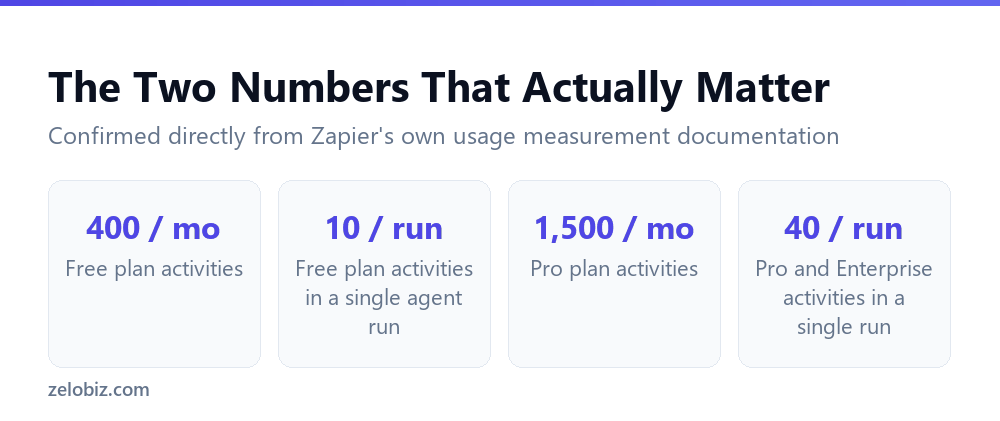
Two separate ceilings apply at once, and missing that there are two is the most common way people misjudge how much a plan actually covers.
The per-run number matters more than it first appears. A monthly allowance of 400 sounds like plenty of room for occasional use, but the 10-per-run ceiling on the free plan means a single, moderately involved agent conversation can hit its own separate limit well before the monthly total does.
What Actually Counts as an Activity
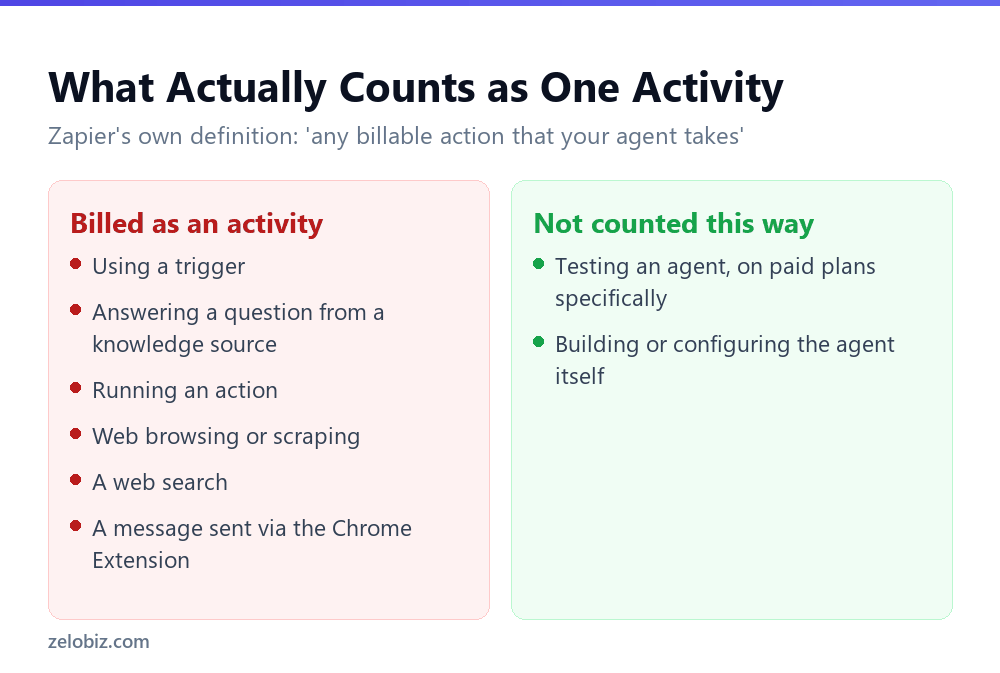
Zapier’s own definition is broad: an activity is any billable action that your agent takes. Specifically, that includes using a trigger, answering a question by drawing on a knowledge source, running an action, web browsing or scraping, running a web search, and sending a message through the Chrome Extension.
There is a genuine exception worth knowing. On paid plans, testing an agent while you’re building or refining it does not count as an activity. On the free plan, however, tests do count toward the monthly quota, which means iterating on a free-plan agent’s configuration spends the same budget as running it live.
⚠️ Watch out: If you’re building and testing an agent on the free plan, every test run draws from the same 400-a-month allowance as production use. Budget for that during development, rather than assuming testing is free the way it is on paid tiers.
How Fast a Single Run Actually Adds Up
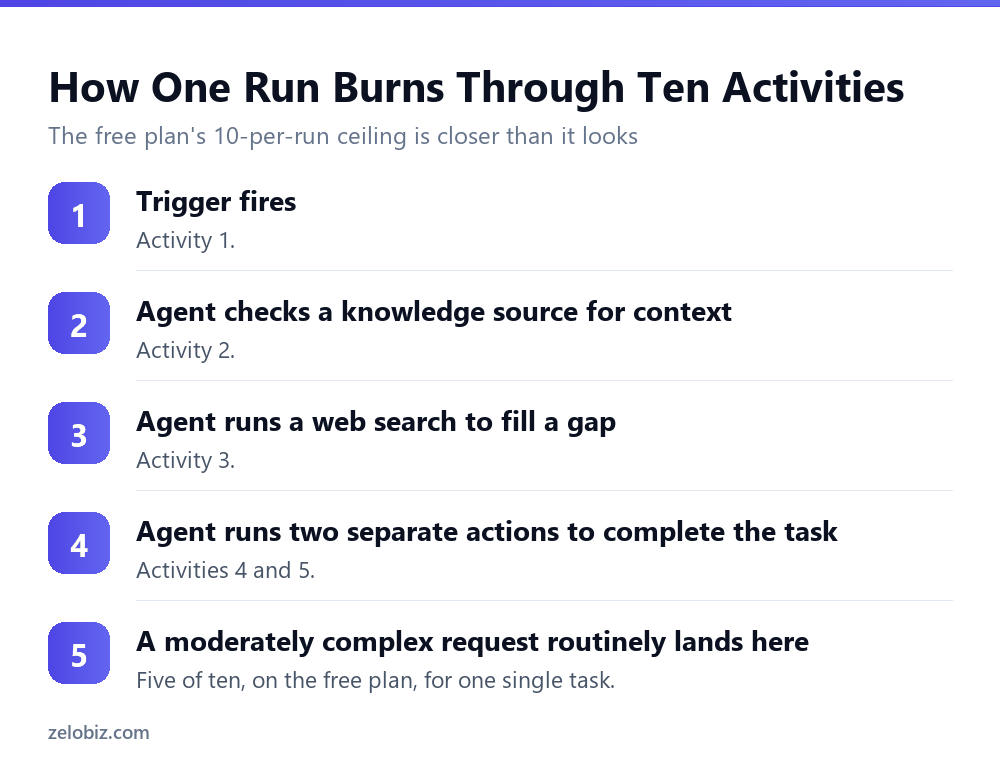
Walking through a realistic example makes the per-run ceiling concrete rather than abstract. A trigger fires: one activity. The agent checks a knowledge source for context: a second. It runs a web search to fill a gap in that context: a third. It then completes the task by running two separate actions: a fourth and fifth.
That is five of the free plan’s ten per-run activities, for a task that involved exactly one search and two actions, which is a modest request by most standards. Anything with a second search, a follow-up question, or a third action pushes well past halfway, and a genuinely multi-step task can exhaust the ten-activity ceiling before it finishes.
Why Enterprise Shares the Free Plan’s Basic Ceiling
One detail in the plan table is easy to skim past and worth pausing on: Pro and Enterprise share the identical 40 activities per run ceiling. Enterprise’s custom pricing negotiates the monthly total, not the per-run limit.
This means a task genuinely too complex to complete within 40 activities in a single run isn’t solved by moving to a bigger plan. It’s solved by redesigning the agent, splitting the work across multiple runs, or restructuring the workflow so each individual run needs fewer steps. No amount of additional monthly budget raises the per-run ceiling itself.
⚠️ Watch out: If an agent is failing mid-run because it needs more than 40 activities to finish one task, upgrading from Pro to Enterprise will not fix it. The per-run limit is identical on both plans, and the fix has to be architectural rather than a plan change.
What Happens When a Run Needs More Than the Limit Allows
Zapier’s documentation addresses this directly, and the answer is more forgiving than you might expect for a single run: occasionally, your agents may accrue activities beyond your plan’s limit to finish a run, and you will not be charged for these extra activities.
That protection is specifically about finishing a run already in progress. It doesn’t extend to starting new work once you’ve exhausted your monthly allowance. Once the monthly limit is reached, agents cannot run new activities, and most features become unavailable until the next billing cycle begins or you upgrade the plan.
💡 Pro tip: Treat the per-run ceiling as the practical design constraint for what an agent should attempt in a single conversation, and the monthly ceiling as the constraint on how often you can run it. Building an agent that routinely needs 8 or 9 of its 10 allowed per-run activities on the free plan is a signal to either simplify what it does per run or move to a plan with more headroom.
📊 Note: None of the model choice questions are covered by these activity limits. Separately from how many activities an agent uses, which AI model tier handles each step determines a different cost, covered in full in AI by Zapier model tiers: what Premium actually costs you.
Designing an Agent Around the Per-Run Ceiling
Rather than discovering the per-run limit mid-build, a few habits shape an agent so it comfortably fits within whichever plan you’re on, especially the free tier’s tighter ten-activity ceiling.
Give the agent fewer, better knowledge sources
Every knowledge source lookup is its own activity. An agent that has to check three separate sources to answer one question spends three activities before it has done anything else. Consolidating reference material into fewer, more complete sources reduces how many lookups a typical question needs.
Avoid designing agents that search the web as a fallback
A web search is a full activity in its own right, and an agent configured to search whenever its own knowledge sources come up short can spend activities unpredictably. If a task’s answer should always come from your own data, scope the agent tightly enough that it doesn’t reach for the web as a default behaviour.
Split genuinely large tasks into smaller agents
An agent trying to do everything in one run, gather context, search, and execute several actions, is the shape most likely to hit a per-run ceiling. Splitting that into a triggering agent and a narrower execution agent often uses roughly the same total activities but avoids concentrating them all into one run that has to stay under a single limit.
A Final Word on Reading Zapier’s Own Numbers
Every figure in this article came directly from Zapier’s own usage measurement documentation rather than from a third-party estimate or a general impression of how the platform behaves. That distinction matters specifically for a billing question, since third-party summaries of usage limits tend to round, simplify, or quietly go stale as a platform updates its own pricing structure.
Before committing a production workflow’s design to any specific number, particularly one as consequential as a per-run activity ceiling, checking Zapier’s current help documentation directly is worth the two minutes it takes, since Zapier can and does revise these figures as the platform evolves.
Common Questions
How many activities does the Zapier Agents free plan allow?
400 activities a month, with a further limit of 10 activities within any single agent run. Both ceilings apply at once.
What counts as one activity in Zapier Agents?
Zapier defines it as any billable action the agent takes: using a trigger, answering a question from a knowledge source, running an action, web browsing or scraping, running a web search, or sending a message through the Chrome Extension. Each is counted separately, not as one activity per conversation.
Does testing an agent count against my activity limit?
On paid plans, no. On the free plan, yes, tests count toward the same monthly quota as live use.
What happens if an agent run needs more activities than my plan allows?
Zapier states you won’t be charged for activities accrued beyond your plan’s limit to finish a run already in progress. Once your monthly allowance is exhausted, though, agents can’t start new activities until the next billing cycle or an upgrade.
How many activities does the Pro plan allow?
1,500 a month, with up to 40 activities per single run.
Is the per-run limit or the monthly limit more likely to be the actual constraint?
For the free plan specifically, the 10-per-run ceiling is often reached before the 400-a-month ceiling, since a single moderately complex task can use half or more of that per-run allowance on its own.
Does Enterprise have a different per-run limit than Pro?
No. Both Pro and Enterprise share the same 40 activities per run limit; only the monthly allowance differs, with Enterprise negotiated on a custom basis.
When It’s Time to Move Off the Free Plan
The per-run ceiling is a more reliable signal for upgrading than the monthly one, since it tells you something about whether an agent can even complete a realistic task reliably, not just how many times you can run it.
An agent that regularly needs 7, 8 or 9 of the free plan’s 10 per-run activities to finish a task is one bad day, one extra search, one additional action, away from failing mid-run. At that point the practical choice isn’t between staying free and spending more. It’s between an agent that reliably finishes what it starts and one that doesn’t, and the Pro plan’s 40-per-run ceiling is the difference.
Treat these two numbers, the monthly total and the per-run ceiling, as answering two genuinely different questions. The monthly figure tells you how much room you have overall. The per-run figure tells you what any single agent is even capable of attempting, and it’s the one worth designing around from the start rather than discovering mid-build.
Read together with the model tier costs that stack on top of every activity, these limits describe a platform that rewards deliberate, minimal design over ambitious, do-everything agents, regardless of which specific plan you’re paying for. Building with that constraint in mind from the first draft of an agent, rather than retrofitting it after hitting a ceiling mid-project, is consistently the faster path to something that actually runs reliably in production.
The Short Version
- →Free: 400 activities a month, 10 per single run. Pro: 1,500 a month, 40 per run.
- →An activity is any billable step: trigger, knowledge lookup, action, search, scraping.
- →Each step in a conversation counts separately, not one activity per task.
- →Testing counts against the free plan’s quota. It doesn’t on paid plans.
- →A run in progress can exceed its activity limit for free, but only to finish.
- →New activities stop once the monthly allowance is used, until renewal or upgrade.