

A meeting recap that says who said what feels authoritative in a way a plain summary doesn’t. Someone’s name is attached to a statement, and that specificity reads as fact. Two documented, unrelated limitations mean it sometimes isn’t.
Neither cause is exotic. One is a setting most people never look at. The other is a hard number that has nothing to do with how the meeting went and everything to do with how many people were in it.
Short answer: Speaker attribution in a Teams recap can fail two documented ways. If people are physically together in a meeting room without voice recognition turned on, their contributions are credited to the room as a whole rather than to individuals. And if a meeting has more than 20 people with an enrolled voice profile, attribution is not provided at all, for anyone, regardless of how the meeting was otherwise configured. Verified against Microsoft’s documentation on 3 September 2026.
The 20 Person Ceiling
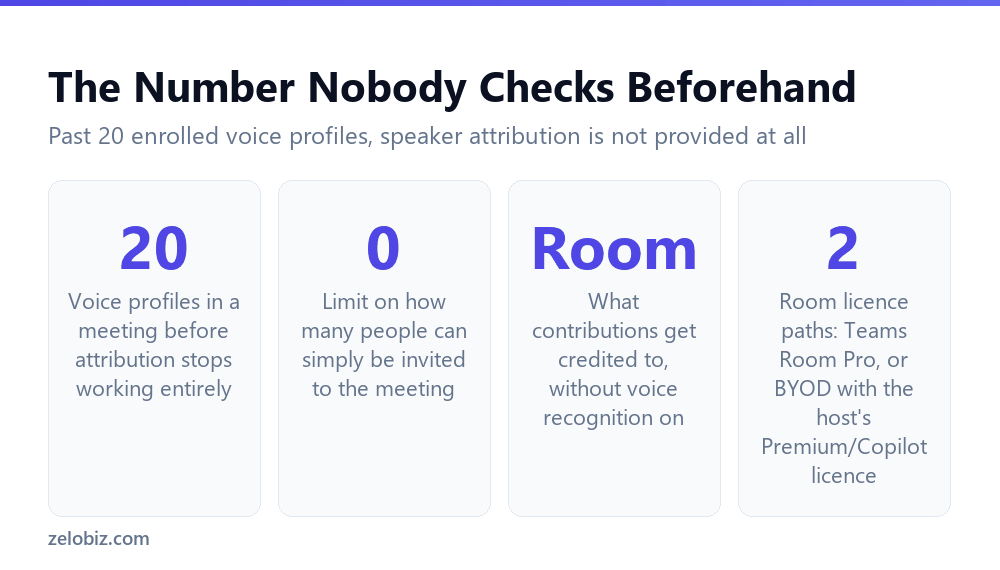
This is the number worth knowing before a large meeting, not after the recap comes back wrong. Microsoft states that if your meeting has more than 20 people with a voice profile, speaker attribution cannot be provided.
The distinction that trips people up is between attending and being voice-enrolled. Microsoft is specific here: there’s no limit on the number of people invited to the meeting itself. A hundred people can join. The ceiling applies specifically to the count of people with an enrolled voice profile among them, and once that count passes twenty, nobody gets individually attributed, not just the ones past the limit.
⚠️ Watch out: For a large meeting, do not assume a recap will correctly credit specific comments to specific people just because it worked that way in smaller meetings you’ve attended. Check the attendee count against the twenty person threshold before treating any attribution in the recap as reliable.
Two Failure Modes, Two Different Fixes
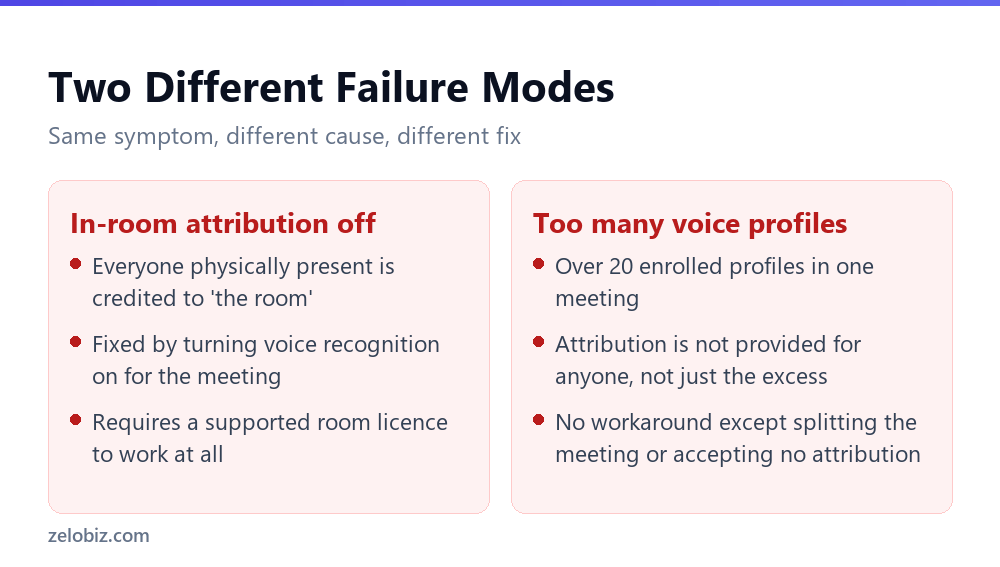
The 20 person ceiling is one cause. A separate and more common one shows up in hybrid meetings, where some people are on a call from a physical meeting room.
Without voice recognition on, the room is one speaker
Microsoft’s guidance is direct: to improve speaker attribution accuracy, turn on voice recognition during meetings that include Teams Rooms. Without it, contributions from individuals physically present are attributed to the room, not to the specific people speaking.
For a recap or set of action items generated from a hybrid meeting, this means every comment made from the conference room can show up under one generic room label rather than under the name of whoever actually said it. Remote participants, by contrast, typically get individual attribution normally.
The room itself needs a specific licence
In-room attribution is not universally available even with voice recognition turned on. It requires a supported Microsoft Teams Room licence: either Teams Room Pro, or a bring-your-own-device room where the host holds a Teams Premium or Copilot licence. A meeting room set up without one of those two paths will not provide individual attribution for people in it, regardless of any other setting.
What Attribution Errors Look Like From the Inside
Nobody sees a flag saying attribution unavailable for this segment. A misattributed comment reads exactly as fluently as a correctly attributed one, which is part of why the pattern is worth knowing ahead of time rather than spotting case by case.
A room label reads like a person
When contributions get credited to the room rather than a person, the recap does not say attribution failed. It typically shows something like Conference Room A said, which looks superficially similar to a named attendee and can slip past a quick read if you are not specifically checking for it.
A large meeting’s recap can read as confidently as a small one’s
Past the 20 voice profile ceiling, Microsoft states attribution is not provided at all. In practice that tends to mean the recap either omits speaker names entirely or generalises to broader terms like a participant raised, rather than displaying an obvious error message. The confidence of the writing does not change based on whether attribution succeeded.
⚠️ Watch out: Fluency is not a signal of accuracy anywhere in generated content, and meeting attribution is a specific case of the same general rule. A well-written sentence crediting the wrong source, or no source at all, reads exactly as well as one that got it right.
Checking a Recap Before It Goes Anywhere
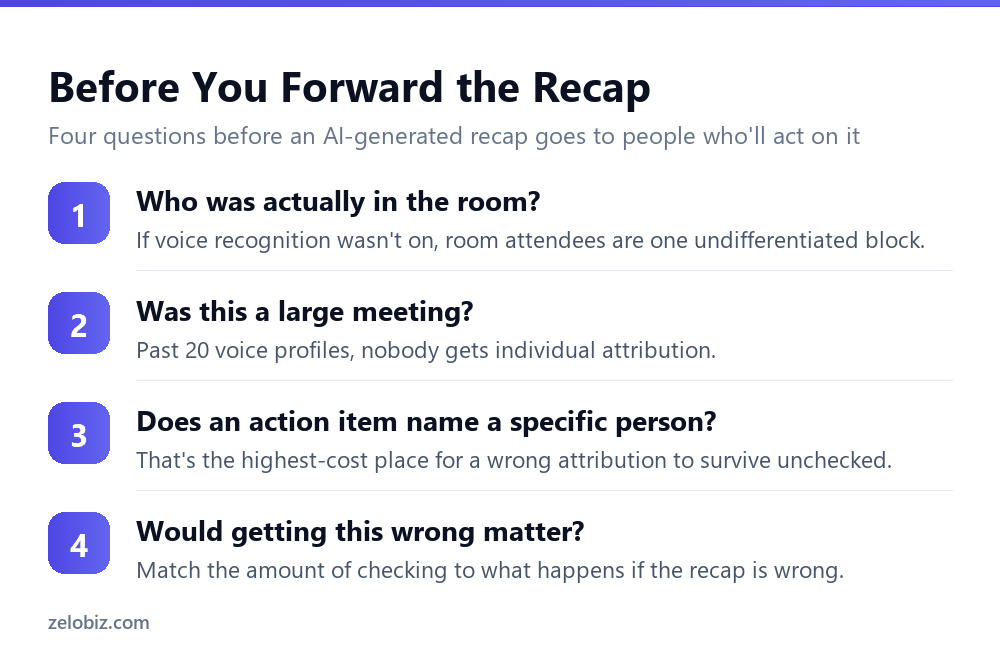
Microsoft’s own disclaimer for this feature is unambiguous: verify your results, because AI-generated content could be incorrect. For a recap, the highest cost place for that to go unchecked is an action item that names a specific person.
Match the check to the meeting, not to a fixed habit
A small, fully remote meeting with fewer than 20 attendees and no meeting room involved is the situation where attribution is most likely to be reliable. A large hybrid meeting with a conference room and dozens of attendees is exactly where both documented failure modes are most likely to show up at once.
Action items deserve a specific check, not a general skim
If a recap assigns a task to a named person, that is worth confirming against your own memory of the meeting or against the recording before it goes out, rather than trusting it because the rest of the summary reads plausibly. A recap can be accurate about what was discussed and wrong about who committed to doing something about it.
💡 Pro tip: For a meeting that mixes a physical room with remote attendees, treat any comment attributed to the room, rather than to a named person, as unverified by default. That single pattern flags most of the misattribution risk without needing to check every line.
📊 Note: None of this means the recap feature is unreliable in general. It means two specific, documented situations produce a specific, predictable kind of error, and knowing the pattern is faster than re-verifying every recap from scratch.
A Worked Example
Say a quarterly planning session runs as a hybrid meeting: fifteen people dialling in remotely and six more gathered in a conference room using a shared Teams Room device. The recap comes back afterwards, and every action item assigned to a remote attendee names them correctly. Every comment attributed to someone in the room is instead credited to the room itself.
Working through the two documented causes: the meeting has well under 20 voice profiles, so the 20 person ceiling is not the explanation. That leaves the in-room cause, and specifically one of two things: either voice recognition was not turned on for that meeting, or it was on but the room itself does not carry a supported licence, Teams Room Pro or a BYOD setup with a Premium or Copilot-licensed host.
The fix that follows depends on which of those two it turns out to be, and it is worth checking both rather than guessing. Turning on voice recognition costs nothing to try first. If the room still shows generic attribution afterwards, the room’s own licence is the more likely gap, and that is a conversation with whoever manages the meeting room hardware rather than something fixable from inside a single meeting’s settings.
💡 Pro tip: When only the in-room attendees are misattributed and the remote ones are fine, that pattern alone rules out the 20 person ceiling and points straight at voice recognition or room licensing. You do not need to guess between the two documented causes; the shape of the error tells you which one you’re looking at.
Why This Compounds With Retention
A misattributed action item is easiest to catch immediately after the meeting, while the discussion is fresh and the recording is readily available to check against. The harder case is catching it weeks later, when the recording it could be checked against may already be approaching its own expiration. We covered exactly how much time that gives you in why Teams recordings expire after 120 days: the window to verify a recap against the source recording is not indefinite.
The underlying setting that determines whether a transcript exists to check against at all is covered in Copilot in Teams meetings: what it can and can’t see. A meeting with no transcript leaves nothing to verify a disputed attribution against, which makes catching a misattribution at the time of the meeting, rather than later, the only reliable option.
Common Questions
Why did my Teams recap attribute a comment to the wrong person?
Two documented causes. If people were physically together in a meeting room without voice recognition turned on, contributions get attributed to the room rather than to individuals. If the meeting had more than 20 people with an enrolled voice profile, attribution isn’t provided for anyone in that meeting.
How many people can be in a meeting before speaker attribution stops working?
More than 20 people with an enrolled voice profile means attribution is not provided at all for that meeting. There’s no limit on how many people can simply attend; the ceiling applies specifically to voice-enrolled participants.
How do I fix attribution for people in a meeting room?
Turn on voice recognition for meetings that include Teams Rooms. It also requires a supported room licence, either Teams Room Pro or a BYOD room where the host holds Teams Premium or a Copilot licence.
Does attribution work normally for remote participants?
Yes, under normal circumstances remote participants are attributed individually. The documented failure modes specifically involve people physically together in a meeting room, or meetings exceeding the 20 voice profile ceiling.
Should I trust action items assigned to specific people in a recap?
Not without checking, especially after a large or hybrid meeting. Microsoft’s own guidance says to verify results because AI-generated content could be incorrect, and action items naming a specific person are the highest-cost place for an error to go unnoticed.
Is there a workaround for the 20 voice profile limit?
Not documented. The practical options are accepting that individual attribution won’t be available for a meeting that size, or splitting a large session into smaller meetings where attribution can work normally.
How long do I have to check a recap against the original recording?
Recordings and transcripts expire after 120 days by default. Checking a disputed attribution becomes harder, and eventually impossible, the closer you get to that window closing.
The Short Version
- →Over 20 enrolled voice profiles in a meeting means no individual attribution at all.
- →There’s no limit on attendees, only on voice-enrolled participants.
- →Without voice recognition on, room attendees are credited to ‘the room’, not to a person.
- →In-room attribution also needs a supported room licence, Teams Room Pro or Premium/Copilot BYOD.
- →Remote participants are attributed normally outside these two situations.
- →Check named action items specifically. That’s where a wrong attribution costs the most.